

Dividia Text Message Terms
Dividia Technologies sends text messages (SMS) to people who sign up for them in one of our services. These terms cover every Dividia text message program. Each program is described below.
For every program
- No text is sent until you confirm by replying YES to the first message.
- Reply STOP at any time to stop the texts; reply START to receive them again.
- Reply HELP, email support@dividia.net or call (866) 348-4342 for help.
- Message frequency varies. Message and data rates may apply.
- Carriers are not liable for delayed or undelivered messages.
- Your mobile number is used only for the program you signed up for. We do not sell or share mobile numbers or text-message opt-in data with third parties or affiliates for marketing or promotional purposes. See our Privacy Policy.
ScaleWatcher Alerts
Program: ScaleWatcher alert texts from Dividia Technologies (Dividia).
ScaleWatcher sends operational text messages about events at your company’s scale sites. Examples include a truck leaving without a ticket, an overweight load, a weight mismatch, or a scale losing its connection. Messages identify the alert, location and scale and may link to the ScaleWatcher app. This program does not send marketing messages.
How to sign up
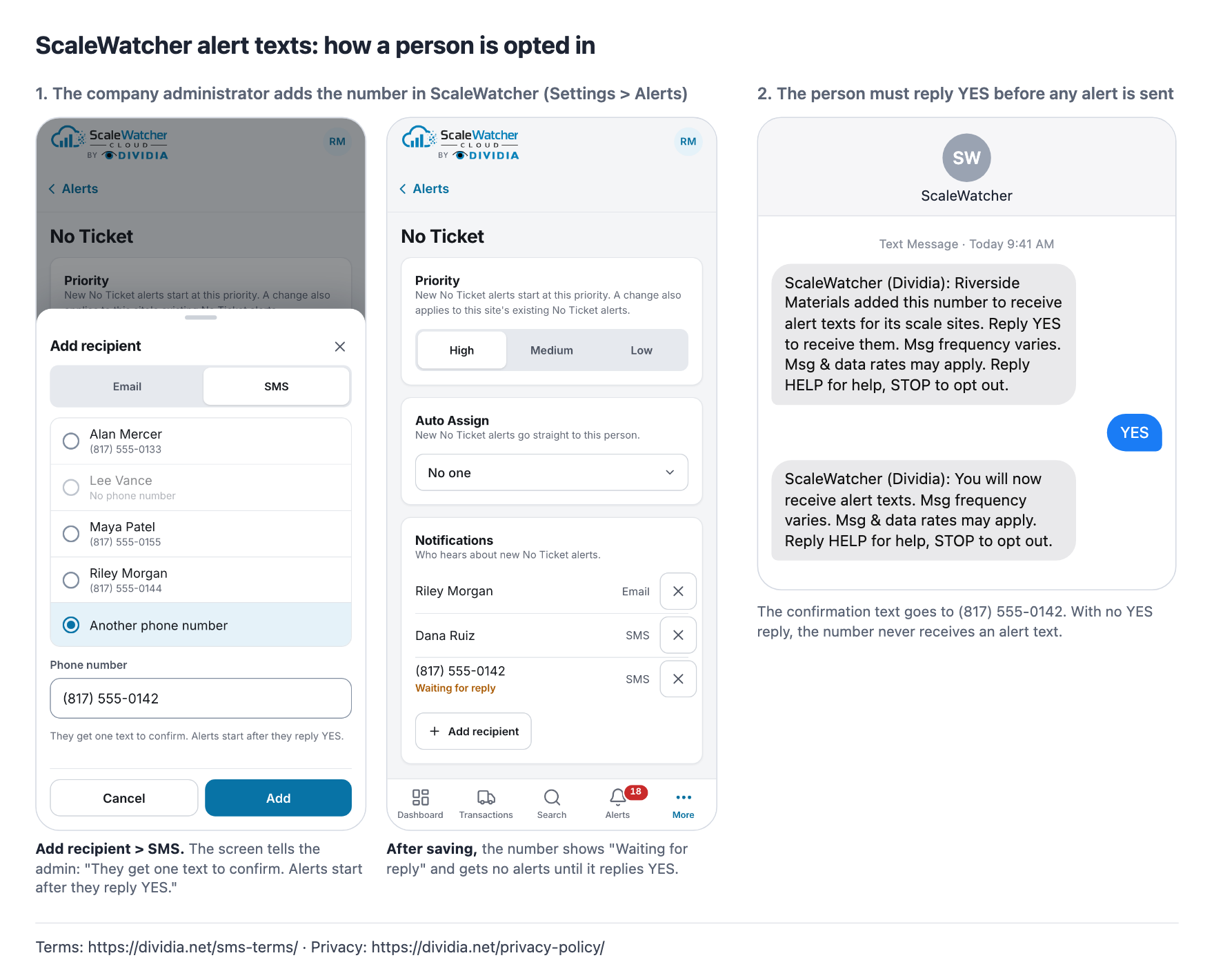
- A company administrator signs in to ScaleWatcher and opens Settings > Alerts. The administrator adds the mobile number of an employee or contact who asked to receive the company’s operational alerts.
- ScaleWatcher sends that number a confirmation request. Reply YES to confirm that you want to receive alert texts. Adding a number in the app alone does not activate alerts. No alert texts are sent until the recipient confirms.
The confirmation request reads:
ScaleWatcher (Dividia): [Company] added this number to receive alert texts for its scale sites. Reply YES to receive them. Msg frequency varies. Msg & data rates may apply. Reply HELP for help, STOP to opt out.
“[Company]” is replaced with the company that added your number. After you reply YES, ScaleWatcher confirms:
ScaleWatcher (Dividia): You will now receive alert texts. Msg frequency varies. Msg & data rates may apply. Reply HELP for help, STOP to opt out.
Message frequency and charges
Message frequency varies with the alert events at the sites and alert types selected by your company. Message and data rates may apply under your mobile carrier’s plan. Contact your carrier about your plan or charges. Consent to receive these texts is not a condition of purchasing Dividia products or services.
Stop or restart messages
Reply STOP to the ScaleWatcher sending number at any time to stop alert texts. You will receive one confirmation that you have opted out. After that, ScaleWatcher will not send further alert texts to that number unless you opt in again. Reply START to opt in again; YES and UNSTOP also confirm your subscription.
ScaleWatcher (Dividia): You will no longer receive alert texts. Reply START to receive them again.
Get help
Reply HELP or INFO to the ScaleWatcher sending number, email support@dividia.net, or call (866) 348-4342.
ScaleWatcher alert texts from Dividia. Help: support@dividia.net or (866) 348-4342. Msg frequency varies. Msg & data rates may apply. Reply STOP to opt out.
Example alerts
- ScaleWatcher: No Ticket alert, High priority, at North Yard, Scale 2, 2:14 PM. Open: https://scalewatcher.cloud.dividia.net/ Reply STOP to opt out.
- ScaleWatcher: Overweight alert, Medium priority, at Cedar Pit, Scale 1, 9:41 AM. Open: https://scalewatcher.cloud.dividia.net/ Reply STOP to opt out.
- ScaleWatcher: Scale Connection lost at Riverside Quarry, Scale 3, 6:02 AM. Open: https://scalewatcher.cloud.dividia.net/ Reply STOP to opt out.
Privacy and delivery
See our Privacy Policy for how ScaleWatcher handles mobile numbers, consent records and messages. Mobile information is not shared with third parties or affiliates for marketing or promotional purposes.
Delivery depends on mobile networks and is not guaranteed. Carriers are not liable for delayed or undelivered messages. ScaleWatcher texts support your operational monitoring and should not be used as an emergency notification service.
ScaleWatcher opt-in example
The example below shows the administrator adding an SMS recipient, the recipient waiting for confirmation, and the YES reply required before alert texts begin.